Camels, Tigers & Unicorns

The discussion panel
A lively discussion chaired by David Gill at St John’s Innovation Centre, Cambridge, UK
I was delighted to be asked to appear on the discussion panel for a seminar at St John’s Innovation Centre entitled “Rethinking science and technology enabled innovation: The Chasm II Challenge”.

The session started with Uday Phadke outlining some of the major elements of the book which he co-authored with Shailendra Vyakarnam – ‘Camels, Tigers & Unicorns: Rethinking Science and Technology-Enabled Innovation’ and went on to a fascinating audience Q&A and panel discussion. In addition to the authors of the book, the panel included Lianne Taylor from the Lord Ashcroft International Business School, Anglia Ruskin University and serial entrepreneur Bryan Amesbury. I was there as someone who has worked in a variety of roles creating, selling and marketing products and services.

Let’s start by explaining the three animals, and then move on to discuss the chasms.

Camels, Tigers & Unicorns

These terms describe three different types of company, particularly in the area of technical innovation.

The camel has all the resources it needs as it travels from one oasis to the next. It’s well adapted for survival in its environment. A traditional engineering company might well be a camel.

A tiger is agile, and it needs to be. It lives in a hostile environment and has to live on its wits, often not knowing where the next meal is coming from. Many high-tech start-ups are tigers.

Unicorns are mythical creatures. Some people believe they really exist, and place billion dollar valuations on start-ups  where in reality there is little more than smoke and mirrors. And, just sometimes, it works.

Chasms and vectors

It was back in 1991 that Geoffrey Moore wrote ‘Crossing the Chasm’. This talked about the difficulties in crossing the chasm in the product lifecycle between the “early adopters” and the “early majority”. Uday and Shai have been looking at real data-sets of metrics for 300 businesses and concluded that there are actually three chasms:

  • Chasm 1 – proving that you actually have a viable product
  • Chasm 2 – generating early sales revenues
  • Chasm 3 – scaling up the business

When the data are normalised and analysed there is a remarkable consistency across companies and sectors.

The authors looked for the factors that affect the progress of a company and identified the following “vectors”:

The discussion panel: Lianne Taylor, Bryan Amesbury, Clifford Dive, Shailendra Vyakarnam, Uday Phadke
The panel: Lianne Taylor, Bryan Amesbury, Clifford Dive, Shailendra Vyakarnam, Uday Phadke
  • Understanding the market space
  • Proposition framing and competition
  • Customer definition
  • Distribution, marketing strategy
  • Commercialisation strategy
  • Business models
  • IP management
  • Manufacturing and assembly
  • Product service definition and synthesis
  • Technology development and deployment
  • Talent, leadership and culture
  • Funding and Investment

The importance of each vector varies depending on the stage the company has reached in its evolution.

The challenge of the second chasm

It seems the second chasm presents a perfect storm. This crossing calls for the greatest number of vectors to be exercised, and it also happens to be the phase when funding and other support mechanisms are most difficult to find or least effective. The background of the panel members offered a variety of perspectives on these challenges, and the audience made a great contribution to a lively discussion.

Solving the problem

Unsurprisingly, good though the debate was, we didn’t come up with an instant solution, but the book makes a number of proposals, as well as suggesting tools which may be used to assist in the journey.

One essential factor is finding the right people to work with the management team to devise a strategy, and to assist in the delivery of that strategy.

Looking for help?

With management team experience on the leading edge of electronic and software innovation in organisations ranging from multinational corporations (including Qualcomm, Cadence and Philips) to technology start-ups and university spin-outs I am ideally placed to help companies as they tackle the first and second chasms. I have a technical understanding combined with real-life experience leading customer-oriented teams in project delivery, product management and business development.

If you’d like to talk about how I could help you to face your challenges don’t hesitate to get in touch.

strategy | product | technology | business

It ain’t what you do, it’s the way that you do it

Image credit: David, https://flic.kr/p/ah2HAg

On Thursday I went to a pub for lunch with an ex-colleague. The next day I went to a different pub for lunch with a different ex-colleague…

…and the experiences got me thinking about account management.

Thursday

We walked into the pub, ordered food and took our drinks to a little niche at the side of the bar area. So far, so good. Then, just as we were settling ourselves, a member of staff approached purposefully.

Member of staff (with a charmless and assertive manner bordering on aggressive): “You can’t sit there, this area’s closed”
My inner self (feeling immediately adversarial): “Where the hell else do you expect us to sit. The bar area’s pretty crowded”
What I actually said (in a very English way): “Sorry”
Member of staff: “…and you should have given a table number when you ordered”
My inner self (increasingly aroused, in a bad way): “Perhaps you should be telling that to the person who took our order”
What I actually said (in a very English way): “Sorry”

So, feeling rather passive aggressive by now, we picked up our drinks and stomped across the bar on a mission to find somewhere we were allowed to sit.

The food was fine, and the  conversation enjoyable. But if Google had asked me for a review of that place at that moment, it would not have been good.

Friday

We entered the pub before noon. The lady behind the bar appeared a little concerned as she told us that food wasn’t available until 12:00. We were happy to talk over a drink and look at the menu until then.

Member of staff (indicating one of the tables): “That table is reserved, but feel free to sit anywhere else”

After a few minutes the member of staff came over to where we were sat.

Member of staff: “It’s really not my day! I got confused – this table is actually reserved for 12:30”
What I said (reflecting the feelings of my inner self and very grateful for the lack of inner conflict): “That’s fine. We’ll move before the food arrives”

…and indeed, we happily took our drinks to another table where we enjoyed our food and conversation without any passive aggressive feelings. A customer-focused approach meant that we were more than happy to be cooperative.

Lesson of the day – it’s the little things that matter

There was no big problem with Thursday’s pub – but we came away unimpressed, not because of the deliverables themselves, but the manner in which they were delivered.

The same principle is true when working on customer projects in my chosen career of product development. Things will go wrong – timescales slip, software bugs happen, there are resourcing issues. Deal with it properly and the customer relationship will be stronger than if the problems had never occurred. Handle it badly, and it could be you’ll never work for that customer again.

That’s why it often makes sense to have someone in the role of account manager, away from the pressures of direct project responsibilities. When problems arise, this semi-detached person can take the broad view on the solution, where the project manager might feel compelled to apply the letter of the agreement. There’s scope to play the “good guy/bad guy” personas and work not only to deliver today’s project but tomorrow’s relationship.

The person in the account manager role should stay in touch with the project, attending both internal and customer progress meetings, but must be careful not to drift into the project manager’s territory. This is especially true for customer meetings – the tone and content of customer messaging should be agreed between the project team and the account manager beforehand.

Equally, the project manager should not be making big promises to the customer without consulting the account manager.

I have seen this model work very well, nurturing long-term trusting and profitable client relationships. I have also worked with companies that don’t see the point – the technical team manages the whole relationship while the project is operating. These companies have had notably low levels of repeat business.

360-Degree Consumer Cameras from a User’s Viewpoint

360As a part of my company’s real-time video stitching work we have been looking at state of the art 360-degree video cameras. Most of our development work has been based on what has become a de-facto standard for professionals capturing 360-degree content in the field – six GoPros mounted in a cube
formation. This rig can produce great results, but it’s expensive, physically cumbersome and difficult to operate. I recently took advantage of the opportunity to use three very different products, all aimed at the consumer market.

My test was based on a realistic use-case for a keen amateur – capturing 360-degree video from a motorcycle for upload to YouTube.

The conclusion

Using the cameras in a real-life situation reminded me that any camera which requires lengthy processing before its content can be used will remain a niche product used primarily by early adopters. As people discard their PCs and do more and more on mobile devices and tablets, products aimed at the mass consumer market cannot rely on a PC for essential functionality. Of these three cameras, only the Giroptic even begins to meet these “instant gratification” objectives. Its secret weapon is real-time video stitching and reprojection in the camera, meaning the video file it outputs is immediately usable on YouTube (and Facebook).

A lot of product reviews dwell on video quality. At the moment, while there are quality differences in the video generated by each  of these cameras, by the time it’s been processed, uploaded to the Cloud and then delivered back over the internet for viewing, it’s difficult to tell the difference between them – in truth they’re all pretty dire if you look too closely.

Which one would I buy? I answer that at the end of this article – but read on for more detail….

The cameras

Kodak PIXPRO SP360 4K (around £350)

SP360 4K 360 Degree VR Camera | KODAK PIXPRO Digital Cameras

This has a single lens with 235-degree field of view which, with the lens pointing upwards, provides all-round 360-degree coverage. It is possible to use two of these back-to-back for a full spherical view, but I chose to use a single camera, which leaves a big blind spot at the bottom.

Ricoh Theta S (around £300)

Product | RICOH THETA S

This uses dual fish-eye lenses back-to-back to provide genuine full 360-degree spherical coverage. The light from the lenses is reflected through 90 degrees on to the sensors, an arrangement that allows the lenses to be very close together, to minimise parallax problems.

Giroptic 360Cam (around £430)

GIROPTIC 360cam Full HD 360-Degree VR Camera GIR360C B&H Photo

This was originally launched as a Kickstarter campaign in 2014, with first products shipping in 2016. It uses three lenses which deliver a 360-degree view but not a full sphere, since there is a significant blind spot looking down.

In use

All of the cameras passed the test of being easily usable without reading the instructions – simply turn on, select video mode and press the “go” button. All happily connected to my laptop via USB and made their content readily accessible. For the Giroptic that content could be directly uploaded to YouTube, which recognised it as 360-degree content but for the Kodak and the Ricoh there was a further step to produce the equirectangular video required. This re-projection (and for the Ricoh, stitching) was handled by the special Windows app for each of the cameras – and for both of them, on my modest laptop, the process literally took hours for a 10 minute clip.

Physically, the Ricoh and the Kodak are the neatest packages, but inexplicably the tripod mount for the Kodak is not underneath in its big blind spot, but on the side, in full view in the video (there is a special mount for the Kodak, with GoPro-like fixing which would address this problem, but I didn’t have the required parts to use it). In my particular test the Ricoh and the Giroptic both mounted neatly and conveniently, with the attachment visually unobtrusive.

Take a look at the YouTube videos I created with each camera:

Kodak SP360

Ricoh Theta S

Giroptic

Which one would I buy?

For general use I’d want the physical compactness and aesthetic quality of the Ricoh. On the other hand, if I wanted an action camera for something like mountain biking or skiing, the Kodak would be a better package. But neither of those has the on-board stitching offered by the Giroptic, which is a real plus point. The Giroptic was the one I took on holiday this year.

Business Bullying – “You’re Fired”

SirAlan[1]Here in the UK bullying is a hot topic right now. It’s hit politics and press headlines with allegations of a culture of bullying in Conservative Central Office. In this case, sadly, the bullying might have been a factor in the suicide of a young political activist. And whilst this is happening in the nearly real world of politics, we see the latest series of The Apprentice, with Lord Sugar setting a dreadful example to his aspirant apprentices and TV viewers.

Lord Sugar has made (and sometimes lost) a lot of money and is presented as the stereotype of a successful businessman. We are supposed to believe that his style is tough and business-like. But in the show he bullies the contestants, ridiculing them with often arbitrary (and indeed sometimes ridiculously stupid) judgement. He is in the position of overwhelming power and wields that power in an unpleasant and macho alpha-male act. It could never happen in real life, could it?

Well, yes, it could and it does.

“My name is Cliff and I was bullied.”

Let me come out and declare an interest – not so long ago I was the victim of prolonged bullying in the workplace. I might not look like a typical victim of bullying – I’m not young, small, female, shy or insecure. I was doing a job for which I was well qualified, and had a good relationship with my fellow workers. But there was an endemic bullying culture at the very top of the company – a number of the ambitious directors felt the need to enhance their career paths, bigging themselves up by belittling the people working for them. They were intent on getting to the top by climbing on the bodies of their staff.

Bullying was random and arbitrary, mostly by my direct manager, but also by another Board member. I was undermined in meetings with other staff members, and there  was a general lack of respect in interactions.

Despite success in similar jobs for 30 years, I began to wonder if it was me. At the weekend I’d be thinking positively, and looking forward to the coming week – I enjoyed the work and the company. By the end of Monday all those positive feelings had been metaphorically beaten out of me. I was doubting my own abilities – everything I did turned out badly. It became a self-fulfilling prophesy.

What to do?

My manager was seen as a hero figure by his colleagues on the Board. There was no realistic way of rectifying the situation from within. I was not the only person to be suffering in this way. Eventually the decision was made for me. I was told to stop making arrangements for my next business trip. When I asked why, I was taken to a meeting room and told that I was to be made redundant. My feeling was of overwhelming relief. I was losing a good job and approaching my 60th birthday, but concerns over future income were as nothing compared to the emotional release of leaving.

If you’re in a job where you’re being bullied by management, remember these points:

  • It’s not your fault — you shouldn’t need to make allowances for the management
  • If the macho bullying culture is part of the management style it’s not likely you’ll be able to change things — you will probably have to move on. It’s best if you can accept the inevitable and do it on your terms
  • You only have one life — don’t let your job ruin it. You will feel a lot better when you move on
And now?

I had fantastic support from friends and colleagues and took the opportunity to start freelance work, which has allowed a whole bunch of new experiences and the recognition that the problem was not me.

Conclusions

Bullying in any aspect of life is distasteful. In the work environment it’s as bad as it can get. We spend most of our waking life at work, and it pays for our way of life. For many it’s also a source of intellectual satisfaction and a major component of their identity. In companies like the one I was in, Lord Sugar style bullying behaviour by senior managers is admired by their peers and actively supported by HR, and despite the good intentions of employment law, there is no solution except getting out. All things considered, being made redundant was a good outcome – a little compensation for the wholesale disruption of my career by a small number of talented but flawed individuals – all of whom have incidentally since left the company.

Read more about the Tory Party bullying story here: http://www.theguardian.com/politics/2015/nov/29/lord-feldman-give-evidence-tory-bullying-claims-mark-clarke

Contact

Get in touch if you’d like to talk discuss how my skills and experience could benefit your company.

Windows 10 Upgrade – was it worth it?

Windows 10
Was it worth it?

When I was asked that question I was in the middle of solving consequential problems, and my thoughts were probably tainted by having to address a bunch of issues that shouldn’t happen, but always do. I wasn’t convinced it was worth it.

Now that I’m mostly recovered from upgrade trauma I thought it would be good to summarise my experience of the upgrade process so that perhaps others might benefit, and in later years I might re-read it to obliterate any thoughts I might have in the future that some similar process might just work.

The starting point

This upgrade was on my personal laptop – at work we’re going for a wait and see policy. At home I had both a laptop and a desktop machine running Windows 7, and each had the Windows 10 icon waiting tantalisingly in the task bar. I had decided to use the desktop machine as the guinea-pig. That plan was immediately blown out of the water, because it turned out that its graphics card uses a GPU chip that is not supported by Windows 10. The laptop however was eligible.

The process

In essence the process is click the button, go away for a while and come back to a Windows 10 machine – and indeed, to a first order that’s exactly how it worked (unlike the experience of a friend, whose machine hung at around the 60% point and had to be restarted). I didn’t measure it, but the elapsed time would have been measured in hours. But that reboot into the new Windows was just the start.

Now what

On entering this new world there’s a bit of configuration to be done, as might be expected. The new Windows 10 user is encouraged to open a Microsoft account, so that the system can be more helpful (and Microsoft can gather a whole bunch of data). This would be more useful if the Microsoft ecosystem were spread across all my platforms, and I’ve already sold my soul to Google, but I signed up anyway and, once the graphics automagically adjusted for my wide screen display, all was looking good, until I tried to interact with my network printer. The HP drivers have always been fragile, and they’d gone missing. A search of the HP web site was not notably helpful – I was beginning to wonder whether my printer was not supported, and all this was a ploy to sell new kit. But then I stumbled over a not very well signposted page http://support.hp.com/us-en/document/c04658195. This no longer exists, but it had links to the right drivers, and clicking them gave me my first experience of the new Edge browser, which was now set up as the default. It all sort of worked, and all I had to do was tread the well-trod path of the HP printer driver installation. A couple of hours later, all was well on that front.

What else

Windows 10 seems to install IIS as default. I sometimes run software which requires a local web-server using HTTP port 80. IIS was now sitting on that port, so we had a problem. After some investigation of whether this would be solved by shutting down IIS or in some other way, I concluded that I could make my local web server listen on port 8080. Problem solved, and indeed better than ever, since that also avoided contention with Skype which had happened in the past.

Using the laptop on my lap with touch pad rather than mouse, I realised that the side scrolling feature of the Synaptics touch pad had gone away. Looking at the web, I soon realised that I was not the only person to notice this, and that the solution is at best messy, involving the forced installation of older drivers, which will probably get overwritten again. I will learn to live with this downgrade.

Drive mapping seems to be different. With Windows 7, I used a virtual drive hosted over the network on my desktop machine as a backup destination. Windows 10 won’t let me map that destination as a virtual drive. Not a big problem – just send the backup to a rather more complicated destination path.

On a similar theme, sharing across the network is not quite right. In theory I should be able to set up a Homegroup on both machines and then set up sharing on this. It doesn’t work. It didn’t work properly before, but it now fails to work in a slightly different and more annoying way. This was solved by being more liberal with sharing than I would like.

Cortana was the new big thing – Microsoft’s version of “Siri” or “OK Google”. If you’re British it doesn’t work. Microsoft says it does, but they are American, and fail to realise that Britain and indeed the rest of the world is not part of America. It doesn’t work, and my computer tells me so. Rumour has it that if you pretend that you’re American, get Cortana set up, and then revert to being British, it might work. Frankly, if they can’t sort this simple thing, I can’t be bothered to try it.

Print to PDF in Edge doesn’t work. Ironic solution is to open the page in Internet Explorer – it does work there.

Was it worth it?

So now I have the joy of three different Windows operating systems on my home PCs – XP, 7 and 10! Windows 10 seems to mostly work. The upgrade stole an entire day of my life, and the computer now has slightly fewer features than it had before. In essence it looks like a tarted-up version of Windows 7, and offers me nothing new. But as someone working in technology who likes to keep up with the latest stuff, it was an experience worth having, with not too bad an outcome…

…and I have absolute faith that the current shortcomings will be addressed in due course.

Update 2017 – how’s it been to live with?

I still have the same laptop, I still have Windows 10 installed, and it works just fine. Of the comments above, the only significant issue has been the loss of scroll functionality for the touch pad. I did download an older driver that worked correctly for a while, but as expected, in subsequent upgrades the touch pad was downgraded. Cortana now works even for the English – with a proper English accent, but I don’t really care, because I find it a bit weird talking to a computer. And I very rarely use Edge, so I have no idea whether I can now print to PDF.

Life of Pi

Very interesting meeting of Cambridge Wireless Future Devices SIG, hosted by ARM, with the title “The Future is Already with Us – How Younger Users of Today’s Technology will Drive the Technology of Tomorrow”

[Note: I have included links to each of the presentations but after an update to the Cambridge Wireless website these are at the time of writing (23 October 2017) no longer accessible. I have left those links in the text because at some later date the content might be made available, either publicly or to CW members only]

mbed LPC1768
ARM mbed LPC1768 platform

First off was an excellent presentation by Chris Styles of ARM tracing the history of computing platforms and the evolution of the ARM mbed OS and associated prototyping platforms, allowing platform-based embedded computing.

Chris was followed by Jason Fitzpatrick of the Centre for Computing History. Another story of the evolution of technology platforms, and how they have affected our lives. Jason reflected that we have moved from all watching our TV together, through solitary computer use in our bedrooms, back to all being together, but playing individually with our tablets and mobiles. As well as providing a home for historic computing and gaming platforms, the Centre for Computing History provides inspirational experiences for children and adults.

Raspberry Pi
Raspberry Pi

The highlight of the afternoon was Jack Lang, whose first-hand account of the development of the Raspberry Pi was informative and at the same time hugely entertaining. We learned about the reasoning behind its development, the surprise of its popularity, and how the manifold applications of the Pi have gone far beyond the original aspirations.

The final presentation was from Steve Marsh of GeoSpock, who expounded on the value of data with associated geographic reference as the number of connected devices grows. This concept can be expanded to include augmentation of the real world and blurring of the real and the virtual. We are moving from the world of the “glassholes” (users of the Google Glass) to the even more exciting HoloLens from Microsoft.

Microsoft HoloLens
Microsoft HoloLens

With thanks to ARM for hosting us, Cambridge Wireless for their usual excellent event management, and to the masters of ceremonies, John Roe and Peter Whale, who both happen to be ex-colleagues.

After the Cloud – the Fog

Picture attribute miikajom, https://www.flickr.com/photos/miikamehtala/15189422771 under Creative Commons Licence https://creativecommons.org/licenses/by-nc-sa/2.0/

Just when you’re getting the hang of one buzzword, then along comes another. We’re now happy to discuss storing our data in the Cloud with Google Drive, and don’t think twice about using Cloud services such as Salesforce. We are beginning to take on board the concept of the Internet of Things, where billions of devices (“Things”) in the real world use the Internet to make information available in the Cloud, and therefore to other Things, or people, or Cloud services. We can be convinced that the billions of Things in the Internet of Things will between them generate lots of information, which will become Big Data when we put it all together. And now we have…

… the Fog.

Like so much jargon it’s not clear where the Fog came from, but Cisco is a name that keeps popping up in this context (see https://www.cisco.com/web/solutions/trends/iot/docs/computing-overview.pdf). They tell us Fog computing takes the concept of Cloud computing and moves it to the edge of the network, closer to the end user. This is good for Internet of Things applications requiring rapid real-time response, or where failure of the system when a communications link fails would not be good – applications like industrial automation, or transport. There is still a connection to the Cloud, but Fog computing takes care of the low level processes in much the same way as our bodies respond instantly to an outside stimulus with a reflex action, only telling the brain some time later what has happened.

The advantages of Fog computing include:

  • Performance – potential for real-time response
  • Reliability and robustness
  • Improved quality of service
  • Superior user experience
  • Reduced data traffic over the internet

To see how this makes sense, consider a security system using multiple cameras. Using video processing techniques the system can recognise the difference between a cat and a burglar, and will automatically alert the operator for one of those and not the other.

Processing in the Cloud

With a simple Cloud architecture, all of the video from all of the cameras would be transmitted to an application in the Cloud – all the time. The Cloud application would process the information from all of the cameras, looking for events requiring an alarm. With multiple installations, we’re looking at a lot of data and a lot of processing. And of course, if the Internet connection were to fail at just the wrong time, bad things could happen.

Processing in the Cloud
Processing in the Fog

If we move some of the processing to the Fog, we have an autonomous sensing system which sends very little data to the Cloud, until it detects a threat, at which point it can send an alert and the associated video – all much more efficient and robust.

As with so many ideas in the Internet of Things, this is not a new concept – but it might just be handy to have a simple word to describe it.

Resources

[Update 3 November 2017] In the three years since this article was initially written, the concepts of the fog, and edge computing have come increasingly to the fore in Internet of Things (IoT) applications. Here are two recent pieces by some of the big players:

A guide to Edge IoT analytics – a blog by IBM
Enabling Management of Edge Computing – a blog by Cisco

Buzzword Bingo (2) – Internet of Things


IMG_5552
Picture: Esteban Romero – Flickr

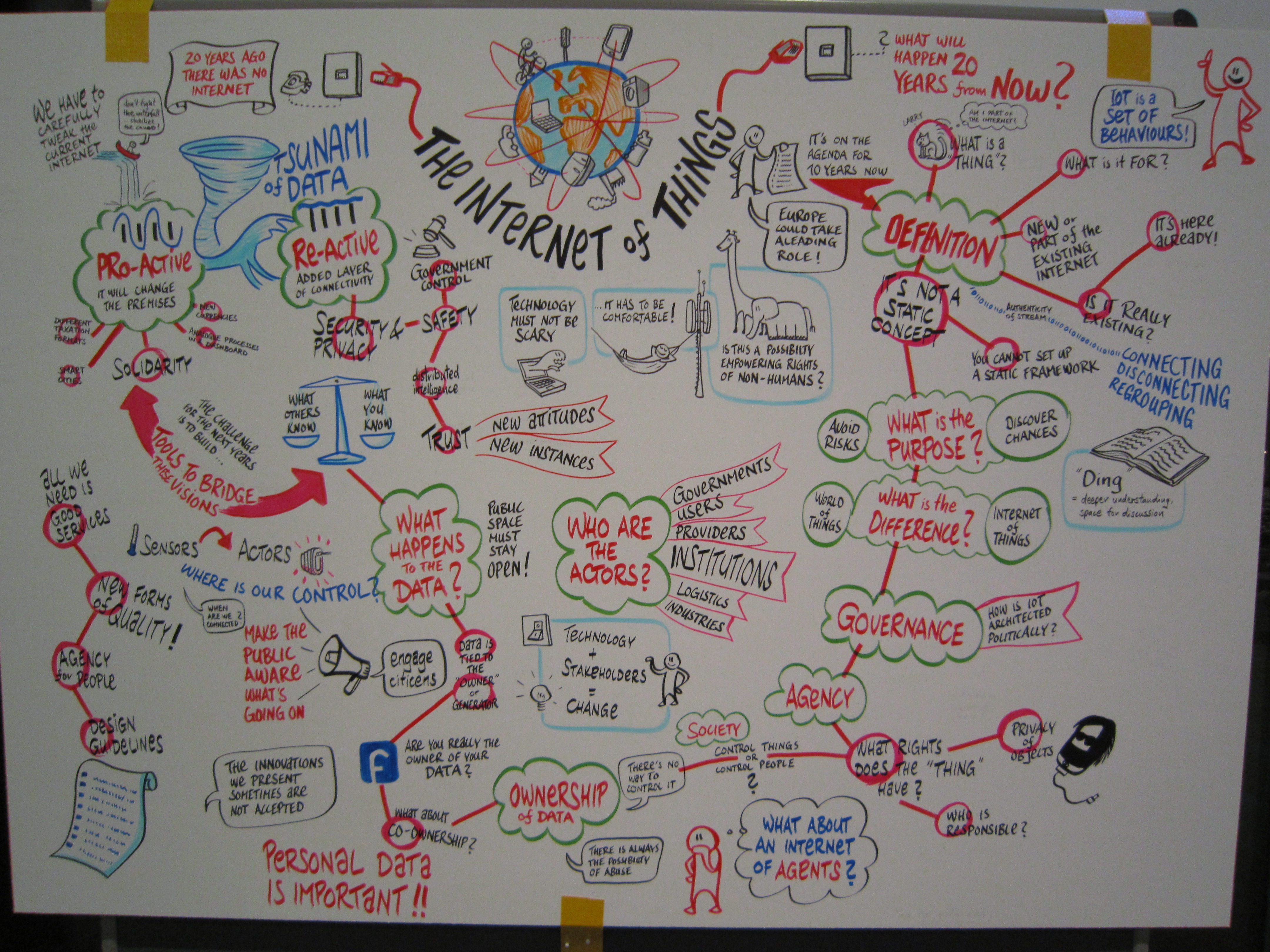
It’s the topic everyone is talking about. Cisco has said that there will be 5 billion devices connected to the Internet by 2015 and 50 billion by 2020. Some, not satisfied with mere Internet of Things (IoT), go bigger with the Internet of Everything. Various other issues are conflated in IoT discussions including Machine to Machine (M2M), Big Data and Internet Protocol Version 6 (IPv6).

A few months ago I was reading an earnest thread discussing whether or not a particular application could be regarded as IoT. I don’t think this obsession with definition is very helpful. I believe that IoT is a catch-all for the phenomenon of increased device connectivity. Devices which used to stand alone can be, and increasingly are being connected. At the moment it’s all rather ad hoc and piecemeal – what used to be standalone devices are now connected standalone devices. This isn’t a bad thing, but it is really only a small part of the journey.

Connecting the devices like this is the low-level technical enabler, the M2M element, but the magic ingredient of fully fledged IoT is the integration of data from multiple sources. As an example of might be done, parameters from multiple sensors (such as temperature sensors in multiple rooms, outside temperature sensors and motion detectors) can be combined with data from other internet sources (such as the weather forecast) and user input via a web page to control heating systems. This could be made more responsive by interpreting users’ calendars or position feedback from mobiles to predict behaviour. A generic implementation of this multi-faceted mash-up would still be challenging. Integration of devices requires standards, which may either be proprietary standards implemented by a single manufacturer or open standards allowing multi-vendor solutions. There will be false starts and failures (for instance Google PowerMeter, providing an energy dashboard for the home was retired in 2011), but the scope for product development is immense – whether or not the Cisco numbers and time-scales turn out to be realistic, we have a trend which will be unstoppable.

Resources

This link gives an interesting explanation of IoT http://postscapes.com/what-exactly-is-the-internet-of-things-infographic


The RFID world is more than your Oyster….

….it can also provide cheap device connectivity.

http://upload.wikimedia.org/wikipedia/commons/b/ba/RFID_Chip_007.JPG
Flexible RFID application

I like to think that I am generally well informed about the possibilities of wireless communication systems, but a while ago I was working on a project in the consumer product sector using an interesting feature of RFID technology which I had never seen before.  It made me realise that there is a whole new world of user interaction with consumer devices which is now possible with the help of NFC capable smartphones.

Most of us are familiar with the idea of RFID wristbands for identifying people at music festivals, RFID cards for door entry systems in the office and smart payment cards such as London’s Oyster cards.  What is less well known is that other exciting applications are made possible by the powerful data-measurement and data-logging functionality of the latest RFID chips, in combination with smartphones and tablets which include NFC technology that can communicate with these chips.  The huge consumer take-up of mobile devices equipped with NFC communications opens the door to the development of new consumer products which build a deeper level of user engagement and the ability for manufacturers to collect valuable product and market information.

It is not the purpose of this article to describe the technology in detail, but a basic understanding of the capabilities of NFC (Near Field Communications) and RFID (Radio Frequency Identification) is useful to recognise the possibilities.  NFC is a recent development of the more general RFID technology which has existed for many years.  Both terms describe standards for wireless data communications between devices at relatively low data rates over short range.   NFC technology is being increasingly built into smartphones and tablets (since this article was originally written Apple have released the iPhone 6 with NFC hardware, but at the moment it can’t be accessed by anything apart from ApplePay) – it operates at a range of a few centimetres, and supports two forms of communication:

  • Two-way peer-to-peer – two NFC equipped devices (phones or tablets) can exchange information when held in close proximity.  The data exchanged may be used directly, or more commonly used as a simple means of pairing, to set up another communications channel (Bluetooth or Wi-Fi Direct).  This is the basis of Android Beam on various Android devices and S Beam, from Samsung
  • One-way – an NFC equipped phone or tablet can read information from an RFID tag.  The tag is typically an inexpensive unpowered passive device, which can be mounted along with the associated antenna in a consumer device or even on a flexible surface such as paper

It is the one-way communications capability that opens exciting new possibilities for consumer-facing products.  In many cases these would not be feasible if the product had to bear the high cost of the NFC reader – but many consumers already have that on their mobile device, and are itching to find exciting things to do with it.

As a first step, a simple application is smartphone automation.  Cheap passive RFID tags can be located on your desk or in your car.  When the smartphone is placed near to the tag it runs an application which can change the phone’s behaviour – perhaps it goes into silent mode in the office, or hands-free mode in the car.  But this is just the start.

Reading temperature with RFID
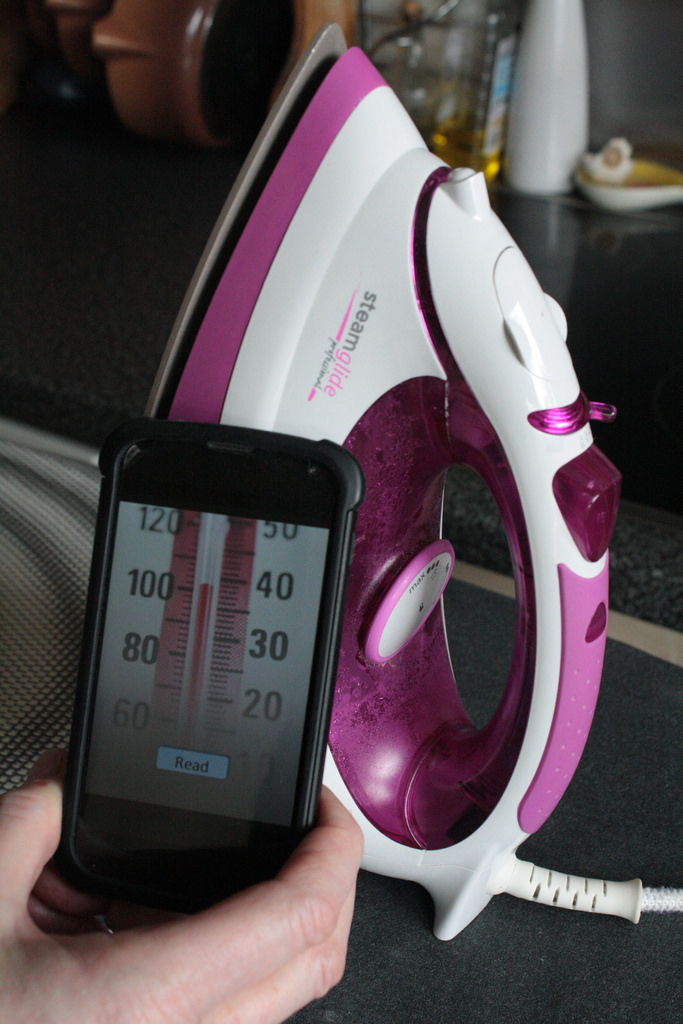
Mock-up of product displaying temperature with RFID connectivity

A simple passive tag returns a fixed ID when read by the smartphone, a bit like reading a bar code – but it doesn’t have to be that simple.  An unpowered passive tag can also have data measurement and data logging capabilities, with the ability for instance to read an analogue value.  A smartphone or tablet can collect critical and variable information from the tag.  This could be a parameter such as temperature, pressure, humidity, voltage or current.  If such a chip is embedded in a consumer product, the user can read the live value of a parameter from the product by running an app provided by the product manufacturer.  The parameter’s value can be time-stamped, stored and displayed by the smartphone or tablet, and sent into the internet Cloud via the mobile device’s internet connection.  Remember, although this RFID device is reading an analogue parameter, and transmitting that value back to the smartphone, it requires no power source – it harvests all the power it needs from the signal it receives from the smartphone or tablet.

If the product is such that the tag can be provided with power (only a tiny amount is required), then the tag can operate in power assisted passive mode with a real-time clock.  This gives the system the ability to take periodic sensor readings autonomously, rather than purely on demand.  When interrogated with a smartphone or tablet via NFC, a series of time-stamped readings will be available, revealing the history of the parameter, so you could look at the temperature profile an item of food as it travels from the supermarket to your freezer, the moisture profile of the soil in your greenhouse, or changes in your blood sugar level over a period of time.

For more complex products, an NFC chip can work alongside a microcontroller, so that the NFC interface can provide a rich set of data covering many parameters.

The common factor with all of these systems is that the product end of the system is relatively cheap and simple – a passive RFID tag can cost less than $1.  A custom design for a high volume product could be much cheaper.  The customers’ own smartphones and tablets are providing the raw processing power, user interface and internet connectivity.

When customers are able to interact with a product using their familiar mobile devices, they become more engaged with that product.  With a well designed app, the product manufacturer can support that product interaction, promote a closer relationship with the customer, the development of a customer community and social networking links.  As a side-effect, the manufacturer can also gather data about their product and their customers, providing both technical and marketing opportunities.

With Internet of Things being the buzzword of the day, RFID technology could be an effective way of allowing low cost consumer devices to join more expensive products in having an internet presence.

Buzzword Bingo (1) – Big Data

data“Big data is like teenage sex: everyone talks about it, nobody really knows how to do it, everyone thinks everyone else is doing it, so everyone claims they are doing it…” (Dan Ariely)

I was working with a data product before I had ever heard the term “big data“. Nesstar had taken an EU funded development all the way to an excellent commercial product, developing the concept of the semantic web to give structure and meaning to data, enabling those data to be disseminated on the web to users with a standard web browser. Users could browse, analyse and visualise data from very large data sets.  The aim was to allow non-expert users to find data relevant to their needs and then, most importantly, to derive meaning from the data.

Ten years on, big data is now a hot topic, often in relation to the Internet of Things – the proliferation of sensors in the Internet of Things will generate lots of data. In many ways the challenge is the same as that addressed by Nesstar – how to gain meaningful insight from large amounts of data.  The difference is in the diversity of the data.  Nesstar worked on static data that had been carefully prepared and uploaded on to a server – data preparation was a major effort.  The new big data story is often about dynamic data collected from many sources, some of them real sensors, others on the internet – the data sources might be controlled by a range of organisations. The data will often be near real-time – there is likely to be little scope for manual intervention in data preparation. The process will in many cases be machine-based from end to end. The common feature is that for big data the challenge is for systems to make sense of the information, either for presentation to humans, or as input into machine controlled systems.

This all means that there’s something for everyone in big data ranging from acquisition, communication, data management and storage and perhaps most importantly the applications making sense of and making use of the data. There are questions of who owns the data (whether it’s analysis of your location or browsing habits as collected by Google, or your electricity consumption as measured by your smart meter) so even the lawyers can take part.

Fortunately for those of us involved in product development, there is still plenty to be done in pulling all these elements together.